Bentley System

2026

Building the next generation of geotechnical software


Resurface is a new application within Seequent Evo, Bentley Systems' cloud-native geoscience platform. It introduces dedicated capabilities for geometry analysis and fixing, enabling engineers to prepare geological models for geotechnical analysis within a unified cloud environment.

As part of the MVP team, I worked alongside a Lead Product Designer, software engineers, and geotechnical experts to shape the core user experience, translating complex engineering processes into intuitive interactions without compromising the flexibility expert users rely on.

As part of the MVP team, I worked alongside a Lead Product Designer, software engineers, and geotechnical experts to shape the core user experience, translating complex engineering processes into intuitive interactions without compromising the flexibility expert users rely on.

Role

Product Designer

Team

1x Lead Product Designer

1x Product Manager

8x Software Engineers

Contribution

Designed the end-to-end experience for geometry issue detection and fixing.

Defined core interaction patterns for the product.

Explored future product concepts, including AI-assisted experiences and advanced workflows.

Role

Product Designer

Team

1x Lead Product Designer

1x Product Manager

8x Software Engineers

Contribution

Designed the end-to-end experience for geometry issue detection and fixing.

Defined core interaction patterns for the product.

Explored future product concepts, including AI-assisted experiences and advanced workflows.

Design challenge

Defining a new product category

There were no dedicated products for geometry analysis and fixing in geomechanics, making Resurface a new category of engineering application. With no established benchmarks or interaction patterns to follow, I collaborated closely with geotechnical experts to define product logic, validate concepts, and design new interaction patterns for complex engineering workflows.

Design goals

What I aimed to achieve

See the bigger picture

Help engineers understand how geometry issues, fixes, and mesh quality influence one another, helping them predict the impact of each decision

See the bigger picture

Help engineers understand how geometry issues, fixes, and mesh quality influence one another, helping them predict the impact of each decision

Keep engineers in control

Give engineers the flexibility to adjust detection settings and control how geometry issues are resolved through a transparent workflow

Keep engineers in control

Give engineers the flexibility to adjust detection settings and control how geometry issues are resolved through a transparent workflow

One seamless workflow

Bring geometry analysis, fixing, and preparation together into a single, connected experience that feels continuous and easy to navigate

One seamless workflow

Bring geometry analysis, fixing, and preparation together into a single, connected experience that feels continuous and easy to navigate

Workflow

Geometry preparation workflow

ReSurface brings geometry analysis, fixing, and preparation into one unified workflow, guiding engineers from model import to analysis-ready geometry. While I contributed across the experience, my primary design focus was on the Analyze and Fix stages, where engineers detect, investigate, and resolve geometry issues.

Design decision 01

Helping engineers make informed decisions

Fixing geometry requires more than identifying issues. Engineers need enough context to understand their model and decide how to proceed. The design focuses on making that context clear, connected, and actionable.

This screen focuses on Mesh Quality. Issue organization and Detection Settings can be found in the Geometry tab. Only selected product features are shown in this case study. More will be shared after the public release in December 2026.

This screen focuses on Mesh Quality. Issue organization and Detection Settings can be found in the Geometry
tab. Only selected product features are shown in this case study. More will be shared after the public release in December 2026.

1. Mesh quality

The interface combines detailed metrics, visual indicators, and contextual guidance to support confident re-meshing decisions

1. Mesh quality

The interface combines detailed metrics, visual indicators, and contextual guidance to support confident re-meshing decisions

2. Issue organization

Issues are organized by type and linked to the 3D scene, making inspection and prioritization more efficient

2. Issue organization

Issues are organized by type and linked to the 3D scene, making inspection and prioritization more efficient

3. Detection settings

Visible, configurable detection criteria give engineers control over how geometry issues are identified

3. Detection settings

Visible, configurable detection criteria give engineers control over how geometry issues are identified

Design decision 02

Making geometry fixing predictable

Applying geometry fixes can significantly change a model. Engineers need to understand what will happen before applying fixes and adapt the process to their needs. Our challenge was to translate these needs into a workflow that feels transparent, flexible for different levels of expertise, and predictable throughout the fixing process.

This screen focuses on Fix Configuration. Fix Settings and the Review workflow are not shown in this case study
due to product confidentiality and will be shared after the public release in December 2026.

1. Transparent fix configuration

The interface clearly communicates which issues will be fixed and which method will be applied to each before changes are made.

2. Adaptable fix settings

The fix settings were designed to support both quick and advanced workflows, giving engineers the right level of control for each task.

3. Review before commit

Rather than applying fixes immediately, the workflow introduces a dedicated review step, giving engineers a chance to validate the outcome first.

Design decision 02

Making geometry fixing predictable

Applying geometry fixes can significantly change a model. Engineers need to understand what will happen before applying fixes and adapt the process to their needs. Our challenge was to translate these needs into a workflow that feels transparent, flexible for different levels of expertise, and predictable throughout the fixing process.

This screen focuses on Fix Configuration. Fix Settings and the Review workflow are not shown in this case study due to
product confidentiality and will be shared after the public release in December 2026.

This screen focuses on Fix Configuration. Fix Settings and the Review workflow are not shown in this case study
due to product confidentiality and will be shared after the public release in December 2026.

1. Transparent fix configuration

The interface clearly communicates which issues will be fixed and which method will be applied to each before changes are made

2. Adaptable fix settings

The fix settings were designed to support both quick and advanced workflows, giving engineers the right level of control for each task

2. Adaptable fix settings

The fix settings were designed to support both quick and advanced workflows, giving engineers the right level of control for each task

3. Review before commit

Rather than applying fixes immediately, the workflow introduces a dedicated review step, giving engineers a chance to validate the outcome first

3. Review before commit

Rather than applying fixes immediately, the workflow introduces a dedicated review step, giving engineers a chance to validate the outcome first

Design decision 03

Guiding complex workflows

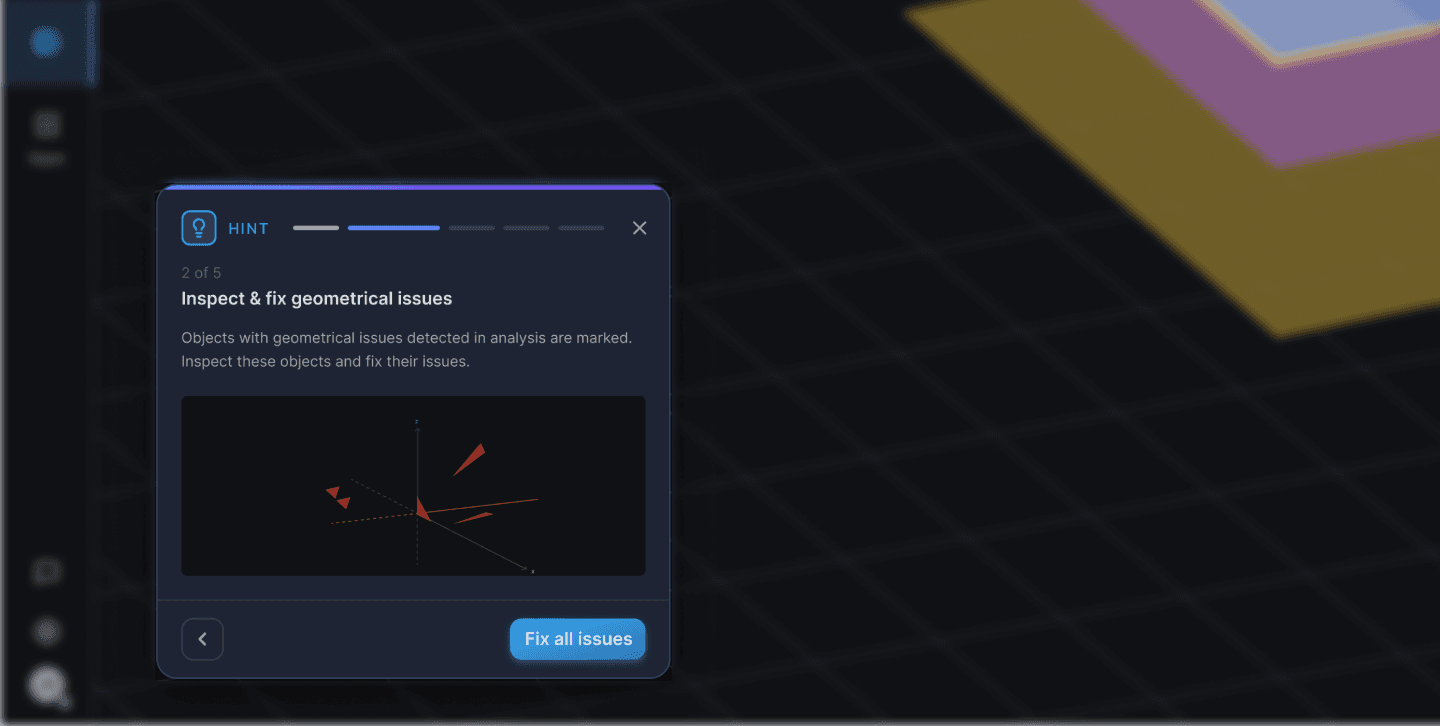
Complex engineering workflows can make it difficult to know what to do next. The experience introduces contextual guidance that helps engineers move through each step with confidence.

Context-aware guidance

Contextual hints explain the purpose of each step when they are needed

Progress and next action

Each hint combines progress, context, and a clear next step

Context-aware guidance

Contextual hints explain the purpose of each step when they are needed

Progress and next action

Each hint combines progress, context, and a clear next step

Next Steps

Beyond the MVP

As the MVP took shape, I explored several concepts beyond the initial scope, considering how the product could evolve in future releases. These concepts illustrate potential directions for expanding the overall experience.

1. Compare before applying

A concept for visualizing changes between the original and fixed geometry, making the impact of each fix easier to understand

1. Compare before applying

A concept for visualizing changes between the original and fixed geometry, making the impact of each fix easier to understand

2. AI-assisted workflow

A concept exploring how AI could simplify complex workflows by guiding engineers, answering contextual questions, and assisting with actions

Conclusion

Final thoughts

This project reinforced my passion for designing complex products. Rather than simplifying the engineering domain itself, I learned how thoughtful interaction design can make sophisticated workflows feel more structured, predictable, and approachable.